
Software / 3D Viewer
3D Viewer for 2D
Image Stacks Free
Turn PNG, JPG and TIF image stacks into fully explorable 3D volumes free of charge. Browse individual planes, render and measure in 3D, clip through structures, overlay multiple datasets, export videos, and generate 3D-printable STL models. Built with HREM data in mind, and equally suited to similar stack image techniques.

A SIMPLE TOOL FOR 3D IMAGE STACKS
Straightforward 3D visualisation, without the learning curve
The 3D Viewer is a straightforward viewer and toolkit for 2D image stacks, built for people who want results quickly without a complex software package or a steep learning curve. It's free to all, and its capabilities continue to expand over time.
EVERYTHING INCLUDED
The full feature set
Across Plane Viewer, Volume Viewer and STL Wizard, the 3D Viewer covers the full workflow from raw image stack to measured, clipped, overlaid, rendered and printable 3D data.

PNG, JPG & TIF support
load common image stack formats directly
Clipping & cropping tools
cut into a volume to focus on a region of interest
Plane-by-plane browsing
step through individual 2D slices in a clean workflow
Basic measurement tools
take simple distance and dimension measurements in 3D
Full 3D volume rendering
with clear, intuitive camera controls
Frame export & video creation
export still frames or generate rotating video clips

A Simple Tool for 3D Image Stacks
This application is a straightforward viewer and toolkit for 2D image stacks. It’s built for people who want to get results quickly, without needing a complex software package or steep learning curve.
It’s free to all, and capabilities continue to expand over time.
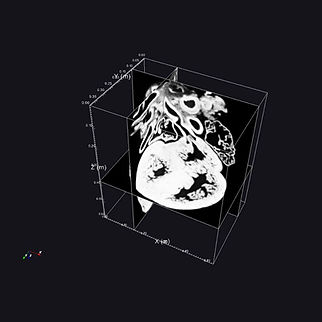
Plane Viewer
Browse and visualise individual image planes from a stack in a clean 2D workflow. Designed for simple navigation, quick inspection, and easy resizing and updates while you explore.
Highlights
-
View slices from PNG/JPG/TIF stacks
-
Resize and update views easily
-
Great for checking structure, contrast, and consistency
time.
Volume Viewer
View your image stack in 3D with practical controls aimed at exploration and communication rather than complexity. Useful for cropping, basic measurements, and exporting views.
Highlights
-
3D volume viewing with clear camera controls
-
Cropping tools to focus on a region of interest
-
Simple measurement tools
-
Colour/appearance controls
-
Export frames and create videos (where supported)
Transform Images to 3D Printable Models
STL Wizard – turn stacks into 3D-printable models
Generate an STL from a 2D image stack for 3D printing or sharing. Includes tools to improve the output by removing holes and cleaning up results.
Highlights
-
Create STL directly from image stacks
-
Hole removal / clean-up tools
-
Export printable models for demos, teaching, or prototyping
Who it’s for
Made for anyone working with image stacks, including microscopy, engineering inspection, research datasets, teaching materials, and general 3D visualisation from 2D slices.

View a HREM Dataset
Visualise a HREM dataset, convert to a 3D and use the volume viewer with a real stack. This stack is downsized to 10% of the original data and has a voxel spacing of X/Y:6um Z: 3um.
For more information or help with 3D rendering, contact us!
Software
Combine and montage 2D images with multiple tools for combining and aligning images.
Software
Visualises TIF/TIFF stacks easily without bulky UI delay or loading in all images.
Contact our Experts
Want to know more about 3D visualisation, request a new feature or get a tutorial?
Contact our friendly team!
Phone:
+44(0) 1462633500
Email:
hello@indigo-scientific.co.uk